 Mock Interview Copilot
Frequently asked questions
Mock Interview Copilot FAQ
Mock Interview Copilot is an AI interview practice tool: an AI interviewer asks questions from your CV and the job description, listens to your spoken answers, follows up, and scores each answer with corrections. You can try it free with $1 of credit and no card, use it free with your own AI keys, or pay $29 a month for Pro.
What it is
What is Mock Interview Copilot?
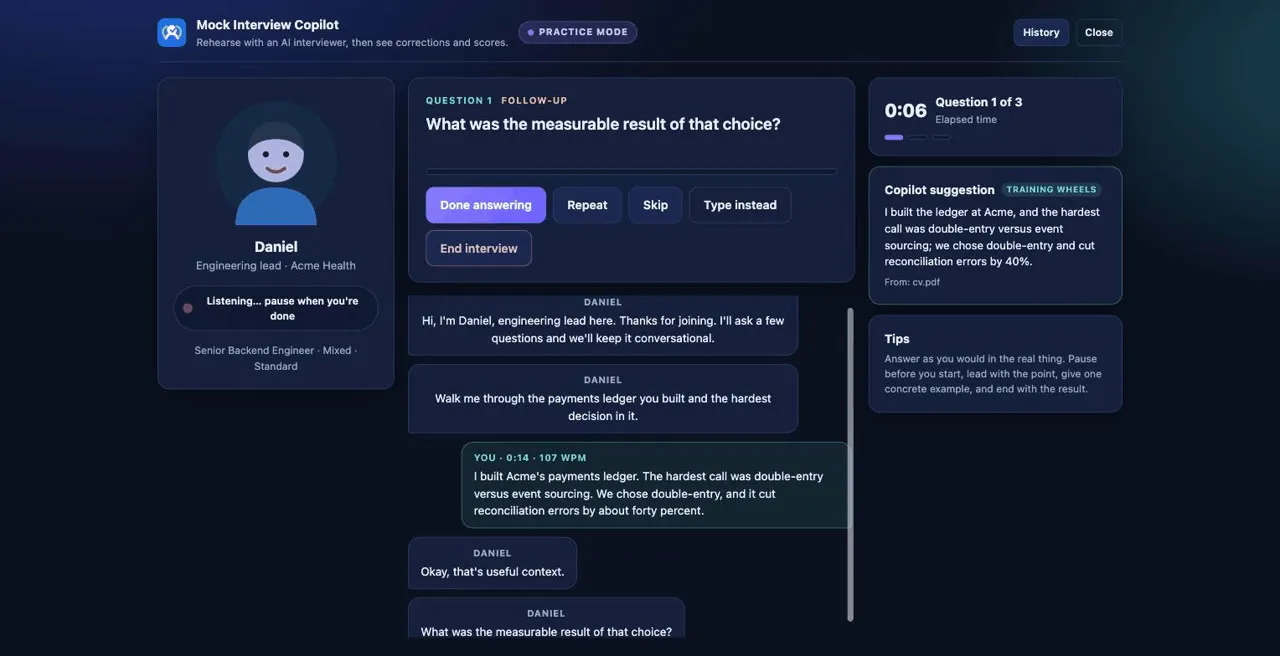
Mock Interview Copilot is an interview practice tool from Zapx Labs. In its practice room an AI interviewer asks questions built from your CV and the job description, listens while you answer out loud, follows up when an answer is vague, and scores each answer on structure, relevance and specificity, with a stronger version you could say. It also measures your pace, filler words and pauses.
How does an AI mock interview work?
You choose an interviewer, an interview type and a difficulty, upload your CV and the job description, and start. The interviewer asks a question out loud, you answer by speaking, it may follow up once if your answer lacks an example or a result, and at the end you get a report with a score and corrections for each answer. You can run 3, 5 or 8 questions per session.
Who are the AI interviewers?
There are four built-in interviewers with different styles: Maya, a warm HR screener; Daniel, a precise engineering lead; Priya, an outcomes-minded hiring manager; and Tom, a blunt senior partner. You can also describe your own interviewer, for example a ward manager or a Civil Service panel member.
What kinds of interview can I practise?
The practice room offers recruiter screen, behavioural, technical, mixed and case or scenario interviews, at Friendly, Standard or Tough difficulty. Technical interviews are conversational: you talk through decisions and experience, there is no live coding test.
Does it work for my job or industry?
Yes, because the questions come from your own CV and the job description you upload, not a fixed question bank. There are also free guides with common questions for more than 70 roles and question types, from nurses and NHS bands to software engineers, call center agents and the Civil Service behaviours.
Can I practise with a friend or coach instead of the AI?
Yes. Have a friend, mentor or coach run a mock interview over Microsoft Teams, Google Meet, Zoom or Webex. The copilot transcribes the call, spots the questions and suggests concise answers from your own notes, so afterwards you can compare them with what you actually said.
Is there a video showing how it works?
Yes. There is a 6-minute step-by-step tutorial, a 70-second video of a full mock interview, and a 68-second video of live answer suggestions in a call. Each has its own page with the full transcript.
Is it a tool for cheating in real interviews?
No. Mock Interview Copilot is built for practice. Use it only in mock interviews, practice sessions and meetings where transcription help is permitted, and get any consent the participants or the law where you live require.
Price, trial and billing
Is Mock Interview Copilot free?
You can use it free in two ways. The free trial gives you $1 of model credit with no card needed, enough for a couple of full practice interviews on the faster models, while each day's free trials last. Or use your own AI provider keys, or a model running on your own computer, and the app stays free; you pay the provider directly.
How much does Pro cost?
Pro is $29 a month. It includes every managed model, among them Claude Opus 4.5, GPT-5 and Gemini 2.5 Pro, plus $8 of model credit each month, which is around 16 practice interviews, fewer if you use the largest models.
What happens when my credit runs out?
You can top up any time from $5, and topped-up credit never expires. Your usage meter on the dashboard shows exactly what you have spent.
How do I cancel Pro?
Open your dashboard on mic.zapxlabs.com and go to Billing, which takes you to the Stripe billing portal, where you can cancel or change your card. Pro is monthly with no long-term commitment, and you keep Pro until the end of the period you have paid for. Any credit you topped up stays on your account.
Who handles my payment details?
Payments are processed by Stripe. Zapx Labs never sees or stores your card details.
Do I need an API key?
Not on the managed plan: sign in and you get one key that covers transcription and answers. If you prefer to bring your own key, you need at least one transcription provider and one answer provider; OpenAI alone can do both.
Which AI providers can I use with my own keys?
OpenAI, Anthropic, Google, AssemblyAI, Deepgram and ElevenLabs. Pick one provider for transcription and one for answers, or a single provider for both, and pay them directly at their own rates.
Apps and devices
Which devices and browsers does it work on?
It runs as a browser extension for Chrome and Edge (and other Chromium browsers such as Brave, Vivaldi and Opera), as a desktop app for macOS, Windows and Linux, as a Mac app on the Mac App Store, and as an Android app on Google Play.
Chrome Web StoreEdge Add-onsMac App StoreGoogle PlayDesktop downloads
Is there a desktop app?
Yes, for macOS 13 or newer, Windows 10 and 11, and Linux (AppImage or .deb). It listens to system audio, so it also works with the Zoom, Teams, Webex and Meet desktop apps, not only their browser versions.
Is there a mobile app?
Yes, an Android app on Google Play. It listens through your phone's microphone and keeps your settings, notes and transcripts on the phone.
Can I use one account on my phone and my computer?
Yes. On your dashboard, add a key for each device, for example Chrome, Desktop app and phone. They all draw on the same credit, and adding one never stops the others working. Keys are shown only once, so if you lose one, revoke it and add a new one.
Which meeting apps does the mock call mode work with?
The browser extension works with the browser versions of Microsoft Teams, Google Meet, Zoom (web client) and Cisco Webex. The desktop app works with any meeting app, including the native Zoom, Teams and Webex apps.
macOS says the app could not be verified. What do I do?
The direct download is not yet notarised. Click Done on the dialog, open System Settings, then Privacy & Security, scroll to the message about Mock Interview Copilot, click Open Anyway and confirm. You only need to do this once. The Mac App Store version does not need this step.
Privacy and data
Is my interview audio recorded or kept?
No audio is kept. Practice sessions are saved on your own device, and your pace, filler words and pauses are measured locally.
Where are my CV, notes and transcripts stored?
On your device: in your browser's local storage for the extension, or in the app's data folder for the desktop and Android apps. They are not uploaded to a Zapx Labs database.
What does Zapx Labs see on the managed plan?
On the managed plan, the questions the app detects and the excerpts of your notes used to answer them are relayed through a Zapx Labs server to the model provider. Zapx Labs counts tokens for billing and does not store that content. With your own keys, nothing goes to a Zapx Labs server at all.
Are there ads or trackers?
There is no advertising and there are no third-party trackers in the extension or desktop app. They send anonymous usage counts, such as how many sessions were started and how long they ran, which you can switch off in settings. The Android app also uses PostHog product analytics, with text, answers and audio hidden, under the same privacy switch.
How do I delete my account?
Email labszapx@gmail.com and ask for your account to be deleted. Your notes and transcripts already live only on your device, so removing the extension or app deletes them there.
Getting better at interviews
How should I practise for a job interview?
Collect the questions you are likely to be asked from the job advert and our role guides, write short STAR examples for the behavioural ones, then say your answers out loud rather than only reading them. Rehearse in a realistic setting, review where you were vague or too long, and repeat the weakest answers.
What is the STAR method?
STAR stands for Situation, Task, Action and Result. It is a way to answer behavioural questions with a real example: set the scene briefly, say what you had to do, spend most of the answer on what you did, and finish with a concrete result. A spoken STAR answer usually works best at around one and a half to two minutes.
Is there a free tool to write STAR answers?
Yes. The free STAR answer builder takes you through each part, then checks the finished answer for a number in the result, “I” rather than “we”, and a speaking time between 1.5 and 2 minutes. It runs in your browser with no sign-up.
How is it different from Google's Interview Warmup?
Interview Warmup let you answer questions out loud and see patterns in your answers, without scoring them, and it no longer loads. Mock Interview Copilot adds an interviewer who asks questions from your own CV and job description, follows up, and scores each answer with corrections.
Can it help with NHS or Civil Service interviews?
Yes. Upload the person specification or job advert and the values or behaviours it lists, and set up your own interviewer, such as a ward manager or a Civil Service panel member. Our free guides cover NHS bands 2 to 7, NHS values-based questions and each of the nine Civil Service behaviours with example answers.
Help
The extension isn't hearing the interviewer. What should I check?
Start listening only after you have joined the meeting, not the lobby, and keep the meeting tab focused. Tab audio captures the other participants; your microphone is optional and off by default.
How do I contact support?
Email labszapx@gmail.com with your browser or app, the meeting platform if you were in a call, and a short description of the problem.
Can't find your answer? Email labszapx@gmail.com.